Tuesday, 18 September 2012

Rikomagic MK802 II as Smart TV

Hardware


  • Rikomagic MK802 II ~75€
  • Microsoft VX 800 ~12€
  • USB Audio Adapter ~5€
  • USB Hub (Powered via power supply) ~7€
  • Wireless Keyboard (e.g. Logitech K400) ~25€

Software

Android settings

  • Animation 0.5x
  • Force GPU
  • Choose Null Keyboard as Input method
  • Change language to the preferred one
  • Set video to 720p@60Hz (1080p works, but it is too much for the hardware)

Todo

  • USB AUDIO Card Status
    • Works, I need to check if output device is set back to AUDIO_CODEC in Skype or Google Talk
  • Webcam Video Status
    • Video works on most apps
    • Device is properly detected by the kernel as UVC compliant camera
    • Skype/Google Hangout: it doesn't handle the output video stream correclty, so when video calling the receiver will have a greenish video
      • Can be related to sync frequency of webcam (50 or 60Hz), or endianess of library
  • Webcam Audio Status
    • CONNECT THE WEBCAM AFTER BOOTING UP
      • Developers hardcoded some changes in their messy way to handle audio: if you change the order/numbering of device some stuff will not work
    • Device is properly detected by the kernel as UVC compliant camera, exposing an additional audio card interface having a single capture endpoint
    • Seems MK802 II firmware is using alsa in the stack, but no asoundrc/alsa.conf file is used
    • [UPDATE] In 121020 firmware, 2 system properties appeared:
      • audio.input.active (AUDIO_CODEC, AUDIO_HDMI, AUDIO_SPDIF)
      • audio.output.active (AUDIO_CODEC, AUDIO_USB#)
    • [UPDATE] In 121020 firmware, the system setting audio_output_channel drives the output device
    • [UPDATE] In 121020 firmware, connecting an USB Audio card we obtain a pop up notifying the audio input and output can be changed
    • [UPDATE] In 121020 firmware, if an application needs audio recording capabilities (like Skype, Google Hangout, Google Talk in Voice chat), audio.output.active is set to AUDIO_CODEC (and no more AUDIO_HDMI)
      • Temporary workaround before automatizing it: go to Audio Settings and set output device back to AUDIO_HDMI
    • I wrote an app to show status of settings before and during a call (Skype or GoogleTalk)...
      • Unfortunately, they are not changing the setting, or at least, there is a setting key called audio_output_channel, which is always set to AUDIO_HDMI
  • Remount /system with RW capabilities
    • Already tried, unsuccessful: mount binary, busybox, adb over wifi, total commander - always "Fail: read only filesystem"
      • Seems some devices (like mine) have a corrupted /system partition, there are 2 solutions:
        • Fix the current image
          • Using a Lubuntu image we can manage to backup, recreate the partition and restore the data
          • Download the Lubuntu image
          • Write the image on the ยตSD (various methods and OSes here)
          • Once MK 802 II boots, you can use miniand as password
          • Backup the data in /system
          • Delete and re-create the partition (you can use GParted or fdisk)
          • Restore the data
        • Update the firmware or reinstall the existing one
  • How to Update to firmware 2012 10 20
  • Keyboard mapping
    • It is still in EN language, but it can be fixed with apps on Google Play, it is a minor issue

Notes

Trying to rebuild from scratch or using CM9 or CM10 repos is possible, but some features will surely break (video acceleration, wifi...). So the way we must follow should be trying to patch as little as possible to enable all the missing features.

Tuesday, 28 August 2012

Softmodem communication on Android

One of the projects I would like to proceed but I am a little stuck due to limited amount of time...
Being able to communicate between Arduino devices and Android via audio cable.
The idea is simple (and not mine): modulate a carrier wave using frequency changes in correspondence of binary data changes. It is called Frequency Shift Keying.
Obviously, transmission data rates are not suitable for media streaming, but enough for trasmitting small amount of information like commands, data from sensors connected to Arduino board, etc....


There is a similar project, called Androino. Another working example, this time on Apple hardware, is IR-Remote.
I think it was a university project but I think it has been abandoned. Source code is available but I wasn't able to make it work.

Hardware

On the hardware side, all I bought is:

Software

Talking about the software, the Arduino code is ready and available as serial interface. It has been developed by ARMS22 (authors of the board too). It is available on this website. They focused their attention on iPhone, but I want to make it work on Android.

An Android client existed too, but it has been removed from the website. For receiving data on Android, the main idea is to use the Audio API to record chunks of audio, perform a zero crossing algorithm on it to store the "distance" between crossings. Then perform an RLE to translate it into valid byte values.
This will be packed into a threaded library offering an input and an output queue as interface for reading incoming data.
For sending data, some code in Javascript is available and it should not be too difficult to implement it in Java.

The issue can be the battery consumption, since we are continuously recording&processing Audio, having no interrupt on Android side.
I am sure an ADK board is the best way to communicate with Android, but it wouldn't be cross-platform and cross-device.


ODROID-X ordered... New project!

ODROID-X is a development board based on Samsung Galaxy S III CPU (Exynos 4412) produced by Hardkernel.
It seems a perfect platform for Android Platform Development. Kernel sources for Android 4.0.4 are available and Linaro seems to support it too.
My first attempt will be to be aware of the potential of the board and on the stability/reliability of the system.
Then tackle down the missing features and/or bug fixes that would make it a perfect device for:

  • Mini PC (focusing on support for webcams, enabling video calls, chat apps)
  • Android Gaming Console (it seems to work properly)

Next steps...

ODROID-X is more or less ready for Android 4.0.4 (I'll confirm when I'll receive it). The missing features can be the support for webcams (at least the ones supported by Linux Kernel having UVC interface) and gamepads (USB HID or BT HID ones).
The webcam support has been studied and Aptina published a whitepaper providing an overview on Android ICS Camera HAL.

Game controllers seem to be already supported.
After the break, gaming capabilities of ODROID-X.

Sunday, 11 December 2011

Paypal, Facebook and SendMoney ...


I begin this post just quoting the rules for using Send Money.
If you send money within the US:
  • It's FREE if you pay using a bank account or your PayPal balance.
  • Credit or debit card fees are 2.9% plus 30 cents. We don’t offer the choice of receiver or sender paying the fee.
If you send US dollars outside the US:
  • 0.5-2% if you pay with a bank account or PayPal balance. The fee depends on where you send the money.
  • 3.4%-3.9% plus 30 cents if you pay with a credit card or debit card.
If you send money from another country, please refer to the Fee section of the local PayPal User Agreement accessible here.
Mashable and other websites followed this launch. As usual, italian media (the printed one) maybe misunderstood that the "social" side of this application is just the fact that it is linked to Facebook (and so supported by a huge number of potential users).
Paypal is not a really independent, it is a private company. Just to remember something about it, I'm quoting Wikipedia EN or PaypalIsEvil:

The current (2011/07/29) PayPal user agreement is a 26 page long pdf document.[73] If one buys an item from a PayPal merchant, one is agreeing to an additional layer of arbitration beyond the merchant himself. Thus even if the merchant has acted improperly, PayPal has not violated its own policy until the user has gone through an extra arbitration process with PayPal. According to their 34-page (single-spaced) user agreement, "If a sender of a payment files a Chargeback, the credit card issuer, not PayPal, will determine who wins the Chargeback," which confirms that a user can employ the normal (legally mandated) dispute resolution process with his credit card issuer, instead of following PayPal's procedures. A user who reads section 13.7 (on page 27) finds notice that the user may have chargeback rights independent of the dispute resolution procedure privileges granted by the PayPal UA. Section 14.1 is entitled "Contact PayPal First" indicates that in case of a dispute, the user must contact PayPal first.
In 2003, PayPal voluntarily stopped serving as an payment intermediary between gambling websites and their customers who engaged in online gambling. When they quit processing payments within online gambling community, they were the largest payment processor for online gambling transactions. In 2010, PayPal resumed accepting online gambling transactions but only in countries where online gambling is specifically legal and they only service those gambling sites who are properly licenced to operate legally in said jurisdictions. [74]
In September 2005, Richard Kyanka, owner of the website Something Awful, set up an account to collect donations for Hurricane Katrina to be given to the Red Cross. Owing to the high rate at which donations were made, the account was automatically frozen, and Kyanka criticized the time and difficulty involved in getting PayPal's customer service to unfreeze the account. In response to the concerns of Something Awful members over the charity used by PayPal, United Way, Kyanka finally opted to have the money refunded to the donors so that they could donate directly to their charities of choice, though PayPal did not refund exchange and handling fees for international donors.[75][76]
In March 2008, Australian current affairs show Today Tonight aired a segment criticising PayPal, with regard to safety, freezing accounts and customer service.[77]
Several PayPal gripe sites and blog posts[78] have been created complaining of problems such as the freezing of accounts of eCommerce stores if they experience rapid growth, preventing them from being able to pay suppliers and fulfill orders.[79] One such site, Paypalsucks.com,[80] ranked third on a Forbes Magazine listing of "Top Corporate Hate Web Sites" in 2005 based on "hostility" and "entertainment value" of web forum postings and other criteria.[81]
In June 2008, the Australian Competition and Consumer Commission found that, "The evidence available does not support the view that PayPal is the most secure method of payment, or offers the best service for all transactions."[82]
In February 2010, PayPal stopped or reversed all "personal" transactions in or out of India without prior notice. Funds already transferred and transactions that had previously been "completed" were reversed leaving many vendor accounts over-drafted. Companies, contractors and service providers throughout India were left in debt to PayPal for services they had already provided when PayPal, without warning or consent, returned funds vendors had already received and withdrawn.[83]
In spite of its international reach, PayPal has limited functionalites for multi-country users, most notably the impossibility to have bank accounts in several countries, or to have a shipping address in a different country than one's bank account / credit card.
In March 2010, PayPal froze donations to Cryptome, seizing over $5300 of in-transit donations.[84] PayPal refused to inform Cryptome of the reason for this action, claiming that to disclose why the donations had been confiscated would violate Cryptome's own privacy.[85] A week later, PayPal offered an apology, which was rejected by Cryptome founder John Young as "insulting and unacceptable".[86]
In September 2010, PayPal froze the account of Markus Persson, developer of independent video game Minecraft. His account contained around €600,000.[87][88]
In December 2010, PayPal permanently restricted an account used to raise funds for WikiLeaks citing it was in violation of the PayPal Acceptable Use Policy. At a conference in Paris, a PayPal VP, in response to an attendee's question, stated the account was restricted after PayPal was allegedly pressured by the U.S. State Department.[89] Afterwards, PayPal reiterated the decision was based on violation of PayPal's Acceptable Use Policy. This was followed by cyber attack on the paypal.com website and a boycott of PayPal, in which some users closed their PayPal account in protest.
In November 2011, PayPal moved all shipping to eBay. This move also forced businesses with multiple users to use only their administrative passwords for all employees, which opens the door to potential account fraud by merchant employees. As a results of this shipping change, many PayPal merchants already frustrated with PayPal fraud protection moved their shipping from PayPal/eBay to other online shippers such as Stamps.com[90]
In December 2011, PayPal froze funds in an account held by April Winchell, the owner of Regretsy, used for charitable giving, requiring the account holder to refund the donations collected but keeping the fees charged. [91][92]
Please, provide right information when publishing something.

Tuesday, 15 November 2011

Music takes a trip on Social Networks

This night, Facebook added to its interface a new Application entry, labeled "Music".
If you're logged in, you can reach the page using this link.
This move from Facebook Hq seems to be related to Google Music release, expected for tomorrow.
Google Music will be presented in Los Angeles during a special event, called These go to eleven. The event seems related/sponsored by T-Mobile, as Engadget told us few days ago.
The deal with T-Mobile consists on the possibility to directly bill purchased tracks. Exclusive content will also be available for T-Mobile customers for free.


A Cold War, which will put the spotlight on the "music" capabilities of social networks, (aka Google+ and Facebook).

Facebook role on Music Provider is to act as broker of music streaming services. At the moment, on the country I live now (France), we have:
I expect, on next weeks/months, to see:
  • Last.fm (job opportunities on the website can be an hint for upcoming "fully featured" service)
  • Pandora
  • Deezer
  • iTunes? (less likely)
Google role seems to be a little different: it will provide directly the music, signing agreements with music producers/distributors.
Google Music is avaliable as closed beta, accessible via invites. The number of available songs is still limited. Google partners with Universal, EMI, Sony Music, 23 independent labels on Google Music, scores exclusive content


Universal closed the Google Music deal just before tomorrow's event.

Google Music has been presented and delivered to all US users.
It is also possible to gain access from everywhere using proxies or using Tor technology.

A small detail... I had Google Music invites an I joined and I had no problems accessing to web interface. Maybe the choice of english language for the UI enabled someway the access for non US users.
I am not able to access Android Market, so I have no direct experience of it.

Stay tuned!

Tuesday, 1 November 2011

Kinect as Webcam on your PC [SOLVED]

So you want to use your Kinect as a webcam, uh?
Yes, it is possible to do that... And it is quite straightforward.

Follow those steps:

  • Download and install latest Kinect for Windows SDK beta
  • Download and install latest MS Visual Studio 2010 Runtimes (you can choose x86 or x64)
    • [Update] It is working with latest Beta 2 release, updated link below
  • Reboot your PC
  • Download KinectCam.ax file and store it in a path you're not going to touch anything for next 10 years (e.g. %WINDIR%)
  • Execute command line as Administrator (Right click on Cmd.exe and Run as administrator)
  • Enter the following command: regsvr32.exe "path of KinectCam.ax file"
  • Feel free to use your expensive webcam on Skype, Google Talk or whatever you want
For some troubleshooting or use openKinect package instead of official Kinect SDK, feel free to follow this link. More info about the creator of the DirectX VideoCapture Filter are there.

Obviously, on Linux, it is supported out of the box thanks to Linux Kernel.

Friday, 26 August 2011

Retail Snow Leopard Mac Os X as Guest on Oracle VirtualBox 4

Latest versions of Oracle VirtualBox allows you to install and run Mac Os X 10.6 out of the box (just one little trick needed). You need a VT-x enabled CPU.
  • Install Oracle VBox
  • Create a VM (Mac Os X / Mac Os X Server)
  • Allocate a Fixed Size Hard Drive (20GB is enough)
  • In the machine properties set 128MB to Video System
  • Leave all as default (Make sure EFI is enabled)
  • Go to your VirtualBox Machine description file (vbox extension) and add those lines in the right position in the XML tree

<extradataitem name="VBoxInternal2/EfiBootArgs" value=" "></extradataitem>
<extradataitem name="VBoxInternal2/SmcDeviceKey" value="ourhardworkbythesewordsguardedpleasedontsteal(c)AppleComputerInc"></extradataitem>

  • Install Mac Os X from an original copy you can buy in an Apple Store
    • You couldn't install Mac Os X on a Virtual Machine because its licence doesn't allow you to do that.
  • Enjoy


Thursday, 30 June 2011

Thursday, 6 January 2011

Windows 8 to support System on a Chip on ARM, x86 architectures

Windows 8 to support System on a Chip on ARM, x86 architectures

There's been plenty of buzz about Microsoft showing off Windows 8 -- if that is, in fact, what the next version is eventually dubbed -- on an ARM device at CES 2011, and a press release from Redmond has made the news official. The upcoming Windows release will support System on a Chip architectures -- including those from ARM, Intel, and AMD.


Windows for ARM is capable of delivering hardware accelerated Web browsing, graphics, and media playback, and USB peripheral and printing support should be on par with its x86 sibling. And yes, there will be an ARM-compatible version of Microsoft Office available as well.


With System on a Chip support in Windows 8, Microsoft pledges to allow 'industry partners to design and deliver the widest range of hardware ever.' Check back for more CES updates from Microsoft as events unfold!


Update: Microsoft has now posted a Q&A session with Windows chief Steven Sinofsky. Hit the link to read his musings!
Windows 8 to support System on a Chip on ARM, x86 architectures originally appeared on Download Squad on Wed, 05 Jan 2011 16:37:00 EST. Please see our terms for use of feeds.

Google shows off Android 3.0, the 'Entirely for Tablet' Honeycomb (video)

Google shows off Android 3.0, the 'Entirely for Tablet' Honeycomb (video)

Well, look who just oozed into being, Google's latest flavor of Android, the tablet-friendly 3.0, Honeycomb. We heard talk that 3.0 would be exclusively for tablets, as in not for phones, and that looks to be played out with the text 'Entirely for Tablet' seen early in the video. Perhaps the best thing to say is that this looks more or less nothing like Android. Sure, the browser is the same, and the Gmail app will be familiar to iPad users, but trust us when we say there's a lot of lovely UI in the video above to admire...and a lot of glowly blue lights, too. Apparently we weren't the only ones who saw Tron:Legacy on opening night.
Continue reading Google shows off Android 3.0, the 'Entirely for Tablet' Honeycomb (video)
Google shows off Android 3.0, the 'Entirely for Tablet' Honeycomb (video) originally appeared on Engadget on Wed, 05 Jan 2011 17:18:00 EDT. Please see our terms for use of feeds.

Thursday, 16 December 2010

PrimeSense's OpenNI provides the best Kinect drivers


We've been so wrapped up in Kinect hacks lately that we actually missed a Kinect non-hack that emerged last week. PrimeSense, who built the initial Project Natal reference hardware for Microsoft, has released its own open source drivers for the Kinect. PrimeSense is working with Willow Garage (best known for its open source ROS robot operating system), and Side-Kick (a motion gaming startup) through a new OpenNI organization it set up, and the trio will be combining their powers for good. The OpenNI framework will cover low-level hardware support (drivers for actual cameras and other sensors), and high-level visual tracking (turning your body into a 3D avatar that kicks ass in a virtual world). This should be a boon to an already vibrant Kinect hacking community, and if the video above is any indication, we aren't far from Kinect-level interaction and gameplay on our lowly PCs.

From Engadget...

I will post some personal opinion and some experiments in few weeks. Stay tuned!

Tuesday, 14 December 2010

DIASPORA* Invites (2 left)

I've obtained an invite for Diaspora* Alpha Test.
Comment or E-Mail me to this post to obtain an invitation ticket.

Wednesday, 8 December 2010

4chan rushes to WikiLeaks' defense, forces Swiss banking site offline

The forces of Anonymous have taken aim at several companies who are refusing to do business with WikiLeaks. 4chan's hordes have launched distributed denial-of-service attacks against PayPal, Swiss bank PostFinance, and other sites that have hindered the whistleblowing site's operations.

A self-styled spokesman for the group calling himself 'Coldblood' has said that any website that's 'bowing down to government pressure' is a target. PayPal ceased processing donations to the site, and PostFinance froze WikiLeaks founder Julian Assange's account. The attacks are being performed under the Operation: Payback banner; Operation: Payback is the name the group is using in its long-running attacks on the RIAA, MPAA, and other organizations involved with anti-piracy lawsuits.

From Ars Technica

Microsoft rolls out free Office Web Apps to 15 additional countries

office web apps

Microsoft began previewing Office Web Apps (OWA) back in September of 2009, and today the Office team has announced expanded availability of the free-to-use OWA. Originally available in just 11 countries, the total number has been more than doubled and is now open to users in China, Denmark, Finland, Hong Kong, Italy, Japan, The Netherlands, New Zealand, Norway, Portugal, South Korea, Spain, Sweden, and Taiwan.

All you need is a Windows Live account, and it's well worth signing up for one if you haven't already. Office Web Apps are fully compatible with their desktop counterparts, and while they're somewhat feature-limited you can use them in good conscience without having to pay a single cent.

Google unveils Cr-48, the first Chrome OS laptop


We've had plenty of pre-knowledge on this, but surprisingly this is our first actual glimpse of Google's new unbranded 'Cr-48,' the very first Chrome OS laptop. Google will distribute the laptop through its Chrome OS Pilot Program, in a sort of public beta. You actually have to apply to join the program, and there are going to be a limited number of the laptops available -- retail Chrome OS models from Acer and Samsung will be available in the middle of 2011 for the masses. Google's doing a number of little promotions to give away the devices to interested users and businesses which will provide feedback, and it looks like there's no way to actually pay money for one right now. Now, for the specs:
  • 12.1-inch screen.
  • Full size keyboard.
  • Oversized clickpad.
  • Qualcomm Gobi 3G chip for Verizon data in the US, your carrier of choice internationally.
  • 802.11n dual-band WiFi.
  • 8+ hours of active use.
  • 8+ days of standby.
  • Webcam.
  • Flash storage.
The keyboard is the one we uncovered last week, with no function keys, but a full row of Apple Keyboard-style actions. The caps lock key has been replaced with a search button, which will enrage internet trolls and screenwriters alike. Branding-wise... there is none. The 'Cr-48' refers to an isotope of the material chromium, there's no logo and no design frills on the laptop itself, and it only comes in black. It seems Google is going out of its way to make it clear that this isn't a mass market device, with Chrome OS still in the beta stage, and no apparent intentions to compete with third parties in the hardware space. Still, we gotta say: we wish more manufacturers would take a page out of this no-frills book. The murdered out Cr-48 looks like pure sex to us.

From Engadget

Tuesday, 7 December 2010

Windows Tip - Mount folder as Drive

Would you like to "mount" a folder as virtual drive?
Here it is the solution:

subst [drive letter] [path to folder]

To un-mount:

subst [drive letter] /d

Hope it helps.

Google Cloud Print hands-on

Google Cloud Print just launched, and we're glad to announce... it works! At least from the Chrome test page.

Google are expected to launch cloud print-enabled Android apps later today, which will mean you can print from your phone direct to your printer -- or indeed any printer that's connected to Google Cloud Print.
The gallery should walk you through each of the steps. It took a while for the document to be printed (a few minutes) but it did eventually print -- that could merely be a connection issue on my end, however.

Original from DownloadSquad. Read more here.

Nexus S and Gingerbread (2.3) Officially Announced

As expected, today Google announced Android 2.3 Gingerbread and the Nexus S. Android 2.3 is the latest iteration of Google’s popular smartphone platform, and includes a number of immediately apparent graphical changes to the Android 2.2 UI, and a host of under the hood features for developers.

Alongside the Android 2.3 announcement came official confirmation of the Nexus S, which appears to be architecturally very similar to the Galaxy S line of devices, with the notable inclusion of near field communication (NFC) hardware, a 4' curved display, and front facing camera, 16GB of memory. Read more here...

In Wired, they explain what to expect from Android 2.3 (and related devices). The NFC feature will enable new earning paths to Google. In my opinion it will be exploited firstly in US.


If you're feeling brave, dive right into the Android 2.3 Platform Highlights. It's aimed at developers, but most of the main features are spelled out in plain English. Here's a taster:

  • Faster, more intuitive text input -- the default keyboard has been significantly improved, and multi-touch 'key-chording' means faster input

  • UI refinements for simplicity and speed -- the UI has been simplified, with menus and settings now easier to find. It looks like the whole thing will be quite bold and 'primary colored'

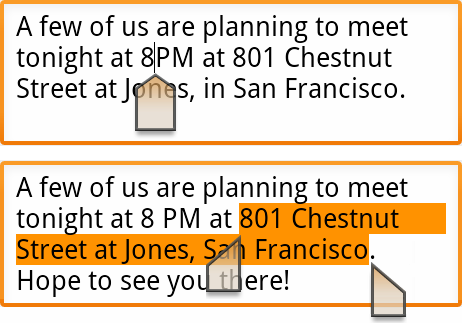
  • One-touch word selection and copy/paste -- this one's quite hard to explain, better to look at the two pictures

  • Improved power management -- apps will be automatically closed if they steal a lot of CPU time, and users can now see at a glance which phone components and apps are taking up the most power

  • More ways to communicate -- Internet calling (VoIP/SIP), Near Field Communication and video calling with the front-facing camera are now possible

There's lots of other low-level changes, but I won't bore you with them. It's safe to say that, as I write this, app developers the world over are drooling on their hairy feet. To put it another way, that Sony PlayStation phone that you've seen on Engadget -- it's only possible because of some big changes in Android 2.3's architecture.
With regards to availability, Gingerbread will be open-sourced in the next few weeks. The Nexus S will be available to buy in the US from December 16, and in the UK from the 20th.
There are videos of the phone itself, and some developers getting their nerd on, after the break.


Continue reading Android 2.3 Gingerbread SDK and the Nexus S announced by Google on Download Squad

Thursday, 2 December 2010

NASA discovers arsenic-born organisms, search for life gets broader parameters


If you were hoping NASA was going to announce the very first tweet from an extraterrestrial being, sorry to break your heart -- it is astrobiological, but the findings are actually borne of this rock. Researchers in Mono Lake, California have discovered a microorganism (pictured) that uses aresnic instead of phosphorous to thrive and reproduce. The latter, as far as human life is concerned, is a buildng block of life along with carbon, hydrogen, nitrogen, oxygen, and sulfur, integral to DNA and RNA. Arsenic, meanwhile, is generally considered toxic to life as we know it. In other words, NASA's proven that life can be made with components different than our current assumptions -- both locally and beyond the stars. That sound you hear is a thousand light bulbs popping up as science fiction writers everywhere conjure up brand new super villains. The press conference is still going on, we're listening in and will let ya know what else we hear.

Read more from engadget or wired.