Showing posts with label Embedded Projects. Show all posts

Friday, 18 May 2018

No-Battery HD Video Streaming Does It with Backscatter

What if Google Glass didn’t have a battery? That’s not too far fetched. This battery-free HD video streaming camera could be built into a pair of eyeglass frames to stream HD video to a nearby phone or other receiver using no bulky batteries or external power source. Researchers at the University of Washington are using backscatter to pull this off.

The problem is that a camera which streams HD video wirelessly to a receiver consumes over 1 watt due to the need for a digital processor and transmitter. The researchers have separated the processing hardware into the receiving unit. They then send the analog pixels from the camera sensor directly to backscatter hardware. Backscatter involves reflecting received waves back to where they came from. By adding the video signal to those reflected waves, they eliminated the need for the power-hungry transmitter. The full details are in their paper (PDF), but here are the highlights.

Battery-free camera design approach

On the camera side, the pixel voltages (CAM Out) are an analog signal which is fed into a comparator along with a triangular waveform. Wherever the triangle wave’s voltage is lower than the pixel voltage, the comparator outputs a 0, otherwise, it outputs a 1. In this way, the pixel voltage is converted to different pulse widths. The triangular waveform’s minimum and maximum voltages are selected such that they cover the full possible range of the camera voltages.

The sub-carrier modulation with the XOR gate in the diagram is there to address the problem of self-interference. This is unwanted interference from the transmitter of the same frequency as the carrier. And so the PWM output is converted to a different frequency using a sub-carrier. The receiver can then filter out the interference. The XOR gate is actually part of an FPGA which also inserts frame and line synchronization patterns.

They tested two different implementations with this circuit design, a 112 x 112 grayscale one at up to 13 frames per second (fps) and an HD one. Unfortunately, no HD camera on the market gives access to the raw analog pixel outputs so they took HD video from a laptop using USB and ran that through a DAC and then into their PWM converter. The USB limited it to 10 fps.

The result is that video streaming at 720p and 10 fps uses as low as 250 μW and can be backscattered up to sixteen feet. They also simulated an ASIC which achieved 720p and 1080p at 60 fps using 321 μW and 806 μW respectively. See the video below for an animated explanation and a demonstration. The resulting video is quite impressive for passive power only.

If the University of Washington seems familiar in the context of backscatter, that’s because we’ve previously covered their battery-free (almost) cell phone. Though they’re not the only ones experimenting with it. Here’s where backscatter is being used for a soil network. All of this involves power harvesting, and now’s a great time to start brushing up on these concepts and building your own prototypes. The Hackaday Prize includes a Power Harvesting Challenge this year.


Read the full article here by Hack a Day

Thursday, 19 April 2018

Raspberry Pi W Antenna Analysis Reveals Clever Design

The old maxim is that if you pay peanuts, you get a monkey. That’s no longer true, though: devices like the Raspberry Pi W have shown that a $10 device can be remarkably powerful if it is well designed. You might not appreciate how clever this design is sometimes, but this great analysis of the antenna of the Pi W by [Carl Turner, Senior RF Engineer at Laird Technology] might help remind you.

[Carl] used some fancy toys in his analysis, such as the awesome-looking antenna test chamber that his employer uses to test designs. He used this to measure two very interesting things; the radiation pattern of the antenna, and the efficiency. Simply put, the efficiency is a measure of how much of the energy you push into an antenna is emitted as RF radiation. There is always a little loss, but he found that the Pi W antenna has decent efficiency, with -3.5 dB losses at WiFi frequencies. That’s nowhere near as good as the stand-up antennas on your wireless router, but remember that the WiFi antenna on the Pi W is tiny compared to them: it is a small spot on the PCB made by removing several layers of copper, creating what engineers call a resonant chamber. That makes it a remarkable bit of engineering, keeping the cost down and using the copper layers that are already on the board to create the antenna rather than adding a new component.

The radiation pattern of the Pi W is also interesting. Because the antenna is located right on the PCB next to the HDMI and USB ports, you might expect that the signal would be much stronger in some directions than others. And you would be right: it seems that the metal shields of the two ports do block some of the radiated signals. However, it is worth remembering that WiFi signals also bounce around a lot, and other factors can influence how strong a connection is.

The final words of the analysis by [Carl] should be something that all hackers remember:

You can always learn things from clever designs and smart engineers. The amount of effort and creativity that has gone into this $10 computer is impressive—and the results speak for themselves.


Read the full article here by Hack a Day

Sunday, 18 February 2018

Photograph of Single Atom Captured with a Plain Old Camera

The Engineering and Physical Sciences Research Council awarded a remarkable photograph its overall prize in science photography. The subject of the photograph? A single atom visible to the naked eye. Well, perhaps not exactly the naked eye, but without a microscope. In the picture above (click here to enlarge), the atom is that pale blue dot between the two needle-like structures.

You probably learned in school that you couldn’t see a single atom, and that’s usually true. But [David Nadlinger] from the University of Oxford, trapped a positively charged strontium atom in an ion trap and then irradiated it with a blue-violet laser. The atom absorbs and reemits the light, and a camera can pick up the light, creating a one-of-a-kind photograph. The camera was a Canon 5D Mk II with a 50mm f/1.8 lens — a nice camera, but nothing too exotic.

The ion trap keeps the single atom balanced between two small needle points about 2 millimeters apart. [Nadlinger] did some math that convinced him the photograph could be possible and made it a reality on a Sunday afternoon. The pale dot isn’t especially spectacular by itself, but when you realize that it is the visual effect of a single atom, it is mind-blowing. Turns out, the lab has taken some similar photographs in the past. They don’t remember who took it, but they have a picture of 9 calcium-43 ions trapped, that you can seen below. The ions are 10 microns apart and at an effective temperature of 0.001 degrees Kelvin.

Other winning photographs included patterns on a soap bubble, an EEG headset in use, and microbubbles used to deliver drugs. There’s also an underwater robot, a machine for molecular beam epitaxy that looks like a James Bond villain’s torture device, and lattices made with selective laser melting 3D printing.

If you want to look at atoms from the comfort of your own home, maybe you should build an STM. You might even try NIST’s improved atom probe while you are at it. Just remember you can’t trust atoms. They make up everything.

Photo credit: David Nadlinger


Read the full article here by Hack a Day

Wednesday, 17 January 2018

Four Pi Zeros, Four Cameras, One Really Neat 3D Scanner

Sometimes when you walk into a hackerspace you will see somebody’s project on the table that stands so far above the norm of a run-of-the-mill open night on a damp winter’s evening, that you have to know more. If you are a Hackaday scribe you have to know more, and you ask the person behind it if they have something online about it to share with the readership.

[Jolar] was working on his 3D scanner project on just such an evening in Oxford Hackspace. It’s a neatly self-contained unit in the form of a triangular frame made of aluminium extrusions, into thich are placed a stack of Raspberry Pi Zeros with attached cameras, and a very small projector which needed an extra lens from a pair of reading glasses to help it project so closely.

The cameras are arranged to have differing views of the object to be scanned, and the projector casts an array of randomly created dots onto it to aid triangulation from the images. A press of a button, and the four images are taken and, uploaded to a cloud drive in this case, and then picked up by his laptop for processing.

A Multi-view Stereo (MVS) algorithm does the processing work, and creates a 3D model. Doing the processing is VisualSFM, and the resulting files can then be viewed in MeshLab or imported into a CAD package. Seeing it in action the whole process is quick and seamless, and could easily be something you’d see on a commercial product. There is more to come from this project, so it is definitely one to watch.

Four Pi boards may seem a lot, but it is nothing to this scanner with 39 of them.


Read the full article here by Hack a Day

Thursday, 11 January 2018

Spectre and Meltdown: Attackers Always Have The Advantage

While the whole industry is scrambling on Spectre, Meltdown focused most of the spotlight on Intel and there is no shortage of outrage in Internet comments. Like many great discoveries, this one is obvious with the power of hindsight. So much so that the spectrum of reactions have spanned an extreme range. From “It’s so obvious, Intel engineers must be idiots” to “It’s so obvious, Intel engineers must have known! They kept it from us in a conspiracy with the NSA!”

We won’t try to sway those who choose to believe in a conspiracy that’s simultaneously secret and obvious to everyone. However, as evidence of non-obviousness, some very smart people got remarkably close to the Meltdown effect last summer, without getting it all the way. [Trammel Hudson] did some digging and found a paper from the early 1990s (PDF) that warns of the dangers of fetching info into the cache that might cross priviledge boundaries, but it wasn’t weaponized until recently. In short, these are old vulnerabilities, but exploiting them was hard enough that it took twenty years to do it.

Building a new CPU is the work of a large team over several years. But they weren’t all working on the same thing for all that time. Any single feature would have been the work of a small team of engineers over a period of months. During development they fixed many problems we’ll never see. But at the end of the day, they are only human. They can be 99.9% perfect and that won’t be good enough, because once hardware is released into the world: it is open season on that 0.1% the team missed.

The odds are stacked in the attacker’s favor. The team on defense has a handful of people working a few months to protect against all known and yet-to-be discovered attacks. It is a tough match against the attackers coming afterwards: there are a lot more of them, they’re continually refining the state of the art, they have twenty years to work on a problem if they need to, and they only need to find a single flaw to win. In that light, exploits like Spectre and Meltdown will probably always be with us.

Let’s look at some factors that paved the way to Intel’s current embarrassing situation.

In Intel’s x86 lineage of processors, the Pentium Pro in 1995 was first to perform speculative execution. It was the high-end offering for demanding roles like multi-user servers, so it had to keep low-privilege users’ applications from running wild. But the design only accounted for direct methods of access. The general concept of side-channel attacks were well-established by that time in the analog world but it hadn’t yet been proven applicable to the digital world. For instance, one of the groundbreaking papers in side-channel attacks, pulling encryption keys out of certain cryptography algorithm implementations, was not published until a year after the Pentium Pro came to market.

Computer security was a very different and a far smaller field in the 1990s. For one, Internet Explorer 6, the subject of many hard lessons in security, was not released until 2001. The growth of our global interconnected network would expand opportunities and fuel a tremendous growth in security research on offense and defense, but that was still years away. And in the early 1990s, software security was in such a horrible state that only a few researchers were looking into hardware.

The Need for Speed

During this time when more people were looking harder at more things, Intel’s never-ending quest for speed inadvertently made the vulnerability easier to exploit. Historically CPU performance advancements have outpaced those for memory, and their growing disparity was a drag on overall system performance. CPU memory caches were designed to help climb this “memory wall”, termed in a 1994 ACM paper. One Pentium Pro performance boost came from moving its L2 cache from the motherboard to its chip package. Later processors added a third level of cache, and eventually Intel integrated everything into a single piece of silicon. Each of these advances made cache access faster, but that also increased the time difference between reading cached and uncached data. On modern processors, this difference stands out clearly against the background noise, illustrated in this paper on Meltdown.

Flash-forward to today: timing attacks against cache memory have become very popular. Last year all the stars aligned as multiple teams independently examined how to employ the techniques against speculative execution. The acknowledgements credited Jann Horn of Google Project Zero as the first to notify Intel of Meltdown in June 2017, triggering investigation into how to handle a problem whose seeds were planted over twenty years ago.

This episode will be remembered as a milestone in computer security. It is a painful lesson with repercussions that will continue reverberating for some time. We have every right to hold industry-dominant Intel to high standards and put them under spotlight. We expect mitigation and fixes. The fundamental mismatch of fast processors that use slow memory will persist, so CPU design will evolve in response to these findings, and the state of the art will move forward. Both in how to find problems and how to respond to them, because there are certainly more flaws awaiting discovery.

So we can’t stop you if you want to keep calling Intel engineers idiots. But we think that the moral of this story is that there will always be exploits like these because attack is much easier than defense. The Intel engineers probably made what they thought was a reasonable security-versus-speed tradeoff back in the day. And given the state of play in 1995 and the fact that it took twenty years and some very clever hacking to weaponize this design flaw, we’d say they were probably right. Of course, now that the cat is out of the bag, it’s going to take even more cleverness to fix it up.


Filed under: Current Events, Hackaday Columns, Rants, Security Hacks

Read the full article here by Hack a Day

Thursday, 14 September 2017

Bluetooth Vulnerability Affects All Major OS

Security researchers from Armis Labs recently published a whitepaper unveiling eight critical 0-day Bluetooth-related vulnerabilities, affecting Linux, Windows, Android and iOS operating systems. These vulnerabilities alone or combined can lead to privileged code execution on a target device. The only requirement is: Bluetooth turned on. No user interaction is necessary to successfully exploit the flaws, the attacker does not need to pair with a target device nor the target device must be paired with some other device.

The research paper, dubbed BlueBorne (what’s a vulnerability, or a bunch, without a cool name nowadays?), details each vulnerability and how it was exploited. BlueBorne is estimated to affect over five billion devices. Some vendors, like Microsoft, have already issued a patch while others, like Samsung, remain silent. Despite the patches, some devices will never receive a BlueBorne patch since they are outside of their support window. Armis estimates this accounts for around 40% of all Bluetooth enabled devices.

A self-replicating worm that would spread and hop from a device to other nearby devices with Bluetooth turned on was mentioned by the researchers as something that could be done with some more work. That immediately reminds us of the BroadPwn vulnerability, in which the researchers implemented what is most likely the first WiFi only worm. Although it is definitely a fun security exercise to code such worm, it’s really a bad, bad idea… Right?…

So who’s affected?

It is difficult to provide a comprehensive list of all affected devices. All unpatched Windows systems from Vista and up: Microsoft secretly released patches in July for CVE-2017-8628. All Linux devices running BlueZ are affected by an information leak and all Linux devices running kernel version 3.3-rc1and up (released in October 2011) are affected by a remote code execution flaw. All Android phones, tablets, and wearables of all versions are affected, except for those which use only Bluetooth Low Energy. Google patches were issued in the September Android Security Bulletin. iPhones, iPads and iPods devices running iOS 9.3.5 and lower and AppleTV devices with version 7.2.2 and lower are affected. Linux-based OSes are likely to be affected, for instance Samsung Tizen OS. I know my Samsung Galaxy S8 is, or so the Android app that the researchers published shows.

It is probably a good idea to check and apply the latest patches available for your favourite devices, especially if they are mobile and you carry them everywhere with Bluetooth on. That being said, the obvious solution is to turn off Bluetooth. This is probably something you already do in order to save battery. Unfortunately, this might not be possible for everyone, especially those who heavily rely on Bluetooth devices, like hands-free, for example.

Meanwhile, enjoy the demo:


Filed under: news, security hacks

Read the full article here by Hack a Day

Saturday, 9 September 2017

Language Parsing with ANTLR

There are many projects that call out for a custom language parser. If you need something standard, you can probably lift the code from someplace on the Internet. If you need something custom, you might consider reading [Federico Tomassetti’s] tutorial on using ANTLR to build a complete parser-based system. [Frederico] also expanded on this material for his book, but there’s still plenty to pick up from the eight blog posts.

His language, Sandy, is complex enough to be a good example, but not too complex to understand. In addition to the posts, you can find the code on GitHub.

The implementation code is Java, but you can still learn a lot even if you plan to use another language. The posts take you through building a lexer (the part that breaks text into tokens), the parser, handling syntax highlighting and autocompletion, creating an abstract syntax tree, and more.

The example compiler generates Java bytecode, so it can produce output that can run anywhere Java can run.

If you are using C, you might consider looking up lex and yacc or flex and bison to get similar results. You might also be interested in using LLVM as a very specific kind of parser if you are wanting to parse C or C++. Either way, a custom language is just the ticket to give your custom CPU project a boost.


Filed under: Software Development, software hacks

Read the full article here by Hack a Day

Saturday, 2 September 2017

Talk: Android on OSS Graphics @ GDG Berlin Android

I would like to thank the wonderful organizers, GDG Berlin Android, for hosting a great community event.

Downloads

If you're curios about the slides, you can download the PDF or the OTP.


Read the full article here by memcpy.io

Tuesday, 11 July 2017

A Live ECU Simulator for OBD2 Projects


A Live ECU Simulator for OBD2 Projects

If you are working with OBD2 hardware or software, it’s easy enough to access test data, simply plug into a motor vehicle with an OBD2 socket. If, however, you wish to test OBD2 software under all possible fault conditions likely to be experienced by an engine, you are faced with a problem in that it becomes difficult to simulate all faults on a running engine without breaking it. This led [Fixkick] to create an OBD2 simulator using a secondhand Ford ECU supplied with fake sensor data from an Arduino to persuade it that a real engine was connected.

The write-up is quite a dense block of text to wade through, but if you are new to the world of ECU hacking it offers up some interesting nuggets of information. In it there is described how the crankshaft and camshaft sensors were simulated, as well as the mass airflow sensor, throttle position, and speedometer sensors. Some ECU inputs require a zero-crossing signal, something achieved with the use of small isolating transformers. The result is a boxed up unit containing ECU and Arduino, with potentiometers on its front panel to vary the respective sensor inputs.

We’ve brought you quite a few OBD2 projects over the years, for example, there was this LED tachometer, and a way into GM’s OnStar.

Thanks [darkspr1te] for the tip.

Posted in Arduino Hacks, car hacksTagged , , , ,


Read the full article here by Hack a Day

Tuesday, 20 June 2017

MRIs: Why Are They So Loud?

My dad was scheduled for his first MRI scan the other day, and as the designated family technical expert, Pop had plenty of questions for me about what to expect. I told him everything I knew about the process, having had a few myself, but after the exam he asked the first question that everyone seems to ask: “Why is that thing so damn loud?”

Sadly, I didn’t have an answer for him. I’ve asked the same question myself after my MRIs, hoping for a tech with a little more time and lot more interest in the technology he or she uses to answer me with more than the “it’s the machine that makes the noise” brush-off. Well, duh.

MRI is one of those technologies that I don’t feel I have a firm enough grasp on, and it seems like something I should really be better versed in. So I decided to delve into the innards of these modern medical marvels to see if I can answer this basic question, plus see if I can address a few more complicated questions.

Spin Doctors

Magnetic Resonance Imaging is based on the technique of nuclear magnetic resonance spectroscopy. NMR uses powerful magnets to align a chemical sample’s atomic nuclei and then tickle them RF waves, revealing structural and chemical properties of the sample under test. NMR spectroscopy has been used for decades to explore the structure of matter; almost every academic or industrial chemistry lab has access to NMR nowadays.

An MRI scanner uses the principles of NMR to map the water molecules in the body by probing for the single proton in the nucleus of hydrogen atoms. A large superconducting magnet produces a strong and stable magnetic field down the long axis of the core of the scanner. When a patient is put into the machine — fair warning to claustrophobics that this is not going to be a happy time for you — the magnetic field gets to work on the protons in the water (and fat) in the patient’s tissues. Each proton has a quantum property called spin, which is a little like the Earth’s axis. Outside of a magnetic field, each proton’s spin axis is randomly oriented, but inside the field, everything lines up. About half the protons are oriented toward the patient’s head, and about half are pointing toward the feet. The protons spinning up and those spinning down cancel each other out, but the distribution isn’t a perfect 50% — there will always be a net spin moment one way or the other. And it’s this fact that makes MRI work.

Each proton has a quantum property called spin, which is a little like the Earth spinning on its axis. Outside of a magnetic field, each proton’s spin axis is randomly oriented, but inside the field, everything snaps into alignment. A little more than half the protons are oriented toward the patient’s head, which is the low energy state, and the rest are aligned toward the feet, which is a slightly higher state and therefore less favored. The result is a slight net spin moment oriented toward the head, meaning that your body is turned into a bar magnet during the exam.

Once the protons are all lined up, a powerful pulse of RF energy is transmitted into the tissue being studied. The exact parameters depend on the study being conducted, but typically the frequency is in the 10 to 100 MHz range at a power of 10 to 30 kW. It’s akin to putting your precious self a few inches from the antenna of a shortwave radio station, which is almost never a good idea. But the RF is rapidly pulsed during the exam, which reduces the duty cycle and decreases exposure risk. But there are cases where significant heating can occur in a patient’s tissues as a result of the radio pulses, to the point where specific positions are forbidden to prevent RF loops that could lead to internal heating, and there are guidelines for reporting “heating events.” I’ve felt this myself; during my last MRI my wedding ring, which was overlooked in the pre-exam search for metal, heated up to the point where I almost asked the tech to stop the exam.

These powerful RF waves stimulate the protons that aligned in the high energy state to flip to their low energy state, releasing RF energy in the process. The amount of signal received is proportional to the number of protons, which in turn represents the amount of water in the different tissues. Of course, this is a drastic simplification of the real physics here. I’ve left out all kinds of detail, like the Larmor frequency, spin precession, relaxation, and a bunch of other stuff. But those are the basics of getting a map of the water in your body

Noisy Coils

But still: why the noise? And more importantly to me: how do we get spatial data from a single antenna? Other imaging techniques using X-rays, like CT scans, are easy to understand — a gantry moves an X-ray tube and a digital detector around your body and turns the stream of density data into a 2D-image based on the position of the beam relative to your body. But nothing moves in an MRI scanner other than the patient bed, and that stays still during the scan. How does an MRI scanner scan?

It turns out that the answers to both those questions are related to another set of magnets inside the scanner: the gradient magnets, or gradient coils. The gradient coils are essentially powerful electromagnets that are designed to slightly distort that carefully aligned, stable, powerful field running down the bore of the scanner. There are three coils located inside the main magnet, arranged to perturb the main field in three dimensions. The result is a magnetic field of varying strength whose location can be very accurately controlled in three dimensions. The scanner’s software correlates the returned RF signal to the location defined by the three gradient fields, generating the astoundingly detailed images we’ve all seen.

But what about the noise? Those gradient coils need to be pulsed very rapidly to scan the point of interest across whatever structures need to be imaged. Thanks to Lorenz forces, each one of those pulses causes the coils to deflect mechanically a bit, causing a vibration in the air. The pulses are generally in the range of a few kilohertz, well within the audio frequency range. And they can be loud, like 110 dB or more. Thinking back on my scans, I can recall an underlying periodicity to the sounds — rhythmic changes that probably correlated to how the gradient was rastering across by body. The things you notice when you turn your mind inward to avoid the panic of claustrophobia.

I’ve only scratched the surface of how MRI works here, but at least I feel like I know a little more about this technology now. It won’t make me any happier to be shoved into that noisy tube again, but at least I’ll be able to contemplate what’s going on around me to pass the time.

And by the way, my dad did fine, and thankfully they didn’t find anything wrong.


Filed under: Hackaday Columns, Interest, Medical hacks

Read the full article here by Hack a Day

Monday, 19 June 2017

DIY Shortcut Keyboard


DIY Shortcut Keyboard

Working with CAD programs involves focusing on the task at hand and keyboard shortcuts can be very handy. Most software packages allow the user to customize these shortcuts but eventually, certain complex key combination can become a distraction.

[awende] over at Sparkfun has created a Cherry MX Keyboard which incorporates all of the Autodesk Eagle Shortcuts to a single 4×4 matrix. The project exploits the Arduino Pro Mini’s ability to mimic an HID device over USB thereby enabling the DIY keyboard. Pushbuttons connected to the GPIOs are read by the Arduino and corresponding shortcut key presses are sent to the host machine.

Additional functionality is implemented using two rotary encoders and the Teensy encoder library. The first knob functions as a volume control with the push-button working as a mute button. The encoder is used to control the grid spacing and the embedded button is used to switch between imperial and metric units. The entire code, as well as the schematic, is available on GitHub for your hacking pleasure. It’s a polished project just ready for you to adapt.

The project can be extended to be used with other computer software such as Gimp and the keys may be replaced by capacitive touch sensors making it more sturdy. Bluetooth can be added to make things wireless and you can check out the Double Action Keyboard to extend functionality further.

VIDEO

Posted in Arduino Hacks, peripherals hacksTagged , , , , ,


Read the full article here by Hack a Day

Wednesday, 14 June 2017

DIY Raspberry Neural Network Sees All, Recognizes Some

As a fun project I thought I’d put Google’s Inception-v3 neural network on a Raspberry Pi to see how well it does at recognizing objects first hand. It turned out to be not only fun to implement, but also the way I’d implemented it ended up making for loads of fun for everyone I showed it to, mostly folks at hackerspaces and such gatherings. And yes, some of it bordering on pornographic — cheeky hackers.

An added bonus many pointed out is that, once installed, no internet access is required. This is state-of-the-art, standalone object recognition with no big brother knowing what you’ve been up to, unlike with that nosey Alexa.

But will it lead to widespread useful AI? If a neural network can recognize every object around it, will that lead to human-like skills? Read on.

How To Do Object Recognition
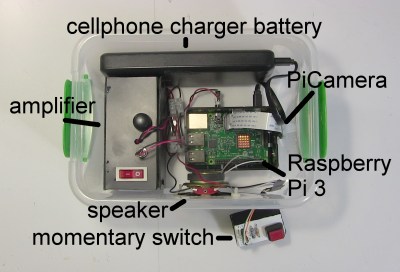
Inception object recognizer internalsInception object recognizer internals

The implementation consists of:

  • Raspberry Pi 3 Model B
  • amplifier and speaker
  • PiCamera
  • momentary swtich
  • cellphone charger battery for the Pi

The heart of the necessary software is Google’s Inception neural network which is implemented using their TensorFlow framework. You can download it by following the TensorFlow tutorial for image recognition. The tutorial doesn’t involve any programing so don’t worry if you don’t know Python or TensorFlow. That is, unless you’re going to modify their sample code as I did.


classify_image.py printing that it saw a pandaclassify_image.py printing that it saw a panda

The sample code takes a fixed named file containing a picture of a panda and does object recognition on it. It gives the result by printing out that it saw a panda. But that wasn’t enough fun.

I hunted around for some text-to-speech software and found Festival. Now when it wants to say it saw a panda, I modified the sample code to run Festival in a linux shell and tell it to actually say “I saw a panda” to the speaker.

http://ift.tt/2sszWnP
But that still wasn’t fun enough. I connected a PiCamera to the Raspberry Pi, and had that take a photo and give it to the TensorFlow code to do object recognition. In the vernacular, it now ran inference on my photo.

And lastly, to make it all real easy I connected a momemtary switch to one of the Pi’s GPIO pins and took the photo when the momentary switch was pressed.

Here’s the Python program’s main() function before…

def main(_):
  maybe_download_and_extract()
  image = (FLAGS.image_file if FLAGS.image_file else
           os.path.join(FLAGS.model_dir, 'cropped_panda.jpg'))
  run_inference_on_image(image)

… and after.

def main(_):
  os.system("echo %s | festival --tts" % "Wait while I prepare my brain...")

  maybe_download_and_extract()
  # Creates graph from saved GraphDef.
  create_graph()

  # preparing for the switch
  GPIO.setmode(GPIO.BCM)
  GPIO.setup(17, GPIO.IN)

  camera = PiCamera()

  os.system("echo %s | festival --tts" % "I am ready to see things.")

  while True:
    # loop for the switch
    while (GPIO.input(17) == GPIO.LOW):
      time.sleep(0.01)

    # take and write a snapshot to a file
    image = os.path.join(FLAGS.model_dir, 'seeing_eye_image.jpg')
    camera.capture(image)

    os.system("echo %s | festival --tts" % "I am thinking about what you showed me...")
    human_string = run_inference_on_image(image)
    os.system("echo I saw a %s | festival --tts" % human_string)

The calls to os.system() are where I run the Festival text-to-speech program to make it say something to the speaker.

maybe_download_and_extract() is where Google’s Inception neural network would be downloaded from the Internet, if it’s not already present. By default, it downloads it to /tmp/imagenet which is on a RAM disk. The first time it did this, I copied it from /tmp/imagenet to /home/inception on the SD card and now run the program using a command line that includes where to find the Inception network.

Running the inception object recognizerRunning the inception object recognizer

The call to create_graph() was moved from inside the run_inference_on_image() function. create_graph() sets up the neural network, which you need do only once. Previously the program was a one-shot deal, but now it has an infinite while loop which calls run_inference_on_image() each time through the loop. Obviously, setting up the neural network is something you do only once (see our introduction to TensorFlow for more about graphs) so it had to be moved above the loop.

The run_inference_on_image() function is where the image is given to the neural network to do the object recognition. It used to just print out whatever it thought was in the image, but I modified it to instead return the text string containing what it thinks the object is, “coffee mug” for example. So the last line is where it would say “I saw a coffee mug” to the amplifier and speaker.

Boxing all that up gave me a small, standalone package that could be carried around and tried out by anyone. Here’s a video of it in action.

An improvement would be to add a small screen so that the user could see what the camera sees, but the PiCamera has a wide viewing angle and a screen turns out to be not necessary.

How Good Is Its Object Recognition

Inception seeing a tobacconistInception seeing a tobacconist

Showing it a cell phone often results in it saying it saw a cell phone, but sometimes an iPod. However, so far it has gotten water bottles and coffee mugs correct every time.

However, it doesn’t do well with people. Pointing it at me in my office causes it to say it saw a “tobacco shop, tobacconist shop, tobacconist”, probably due to the shelves of equipment and parts directly behind me. However, standing against a blank wall it said it saw a sweatshirt, removing that it saw a tee shirt, removing that, it said “bathing trunks, swim trunks”, despite seeing only my bare upper torso and head. (I’ll spare you the photo.)

The neural network is trained on a dataset called ImageNet, the version from the Large Visual Recognition Challenge of 2012. That dataset consists of a huge collection of images divided up into 1000 classes, each class containing images of a particular object. As you can see from this small sample from the cell phone class, some of the phone images are a little dated. However, objects such as coffee mugs don’t change over time.

But that didn’t stop everyone who played with it from having fun, walking around testing it on everything in sight, like finding a magic wand for the first time and waving it around to see what it could conjure.

Is That The Best You Can Do?

Well, first off, each recognition takes around 10 seconds on a Raspberry Pi 3 so either that has to be sped up or a faster processor used, preferably one with a CUDA-enabled Nvidia GPU since that’s the only type of GPU TensorFlow currently supports.

The Inception neural net is only as good as the data it’s trained on. The flaws I pointed out above regarding recognizing cell phones and people are issues with the ImageNet dataset. Only 3.46% of the time are all 5 of its best guesses wrong, whereas humans doing the same test are wrong in their 5 best guesses 5% of the time. Not bad.

As we pointed out in our article about the freaky stuff neural networks do today, Long Short Term Memory (LSTM) neural networks can examine what they see in a single frame of a video, while taking into account what came before in the video. For example, it has more confidence that it saw a beach ball instead of a basket ball if the preceeding scene was that of a beach party. That differs from the Inception neural network in that Inception has only the image you show it to go on.

Where Does This Get Us?

Will improved object recognition lead to widespread useful AI with human-like skills? The evolution of the eye is often cited as a major cause of the explosion in lifeforms known as the Cambrian explosion around 541 million years ago, though there is much debate about that being that cause.

When those eyes evolved, however, there was already some form of brain to use them. That brain already handled the senses of touch, vibration and smell. So improved object recognition alone wouldn’t cause a revolution. For human-like skills our AIs would need more intelligence. We currently have only bits and pieces of ideas of what we need for that.

What many agree on is that our AI would need to make predictions so that it could plan. For that it could have an internal model, or understanding, of the world to use as a basis for those predictions. For the human skill of applying a soldering tip to a wire, an internal model would predict what would happen when the tip made contact and then plan based on that. When the tip contacts the wire, if things don’t go as predicted then the AI would react.

Recent work from Facebook with Generative Adverserial Networks (GANs) may hint at a starting point here that contains such a model and predictive capability (if you’re not familiar with GANs, we again refer you to our article about the freaky stuff neural networks do today). The “generative” part of the name means that they generate images. But more specifically, these are deeply convoluted GANs, meaning that they contain an understanding of what they’ve seen in the images they’ve been trained on. For example, they know about windows, doors and TVs and where they go in rooms.
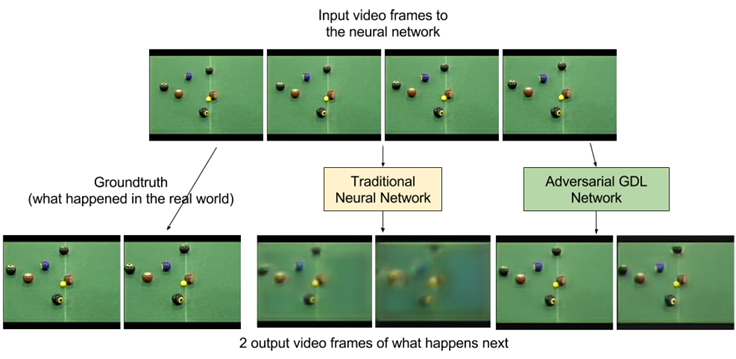
ADGL video predictionsADGL video predictions

What about making predictions? More work from Facebook involves video generation. Using Adversarial Gradient Difference Loss Predictors (AGDL) they predict what the next two frames of a video should be. In the photo of a billiards game you can see the ground truth, i.e. what really happened, and what the AGDL network predicted. It’s not very far into the future but it’s a start.

Those are at least small steps on the path from a naive object recognizer to one with human-like skills.

In Closing

Where might you have seen the Inception neural network recognizing objects before? We’ve covered [Lukas Biewald] using it on an RC car to recognize objects in his garage/workshop.

While this turned out to be fun for everyone to use as is, what other uses can you think of for it? What useful application can you think of? What can be added? Let us know in the comments below.


Read the full article here by Hack a Day

Monday, 29 May 2017

Procedurally Generating Random Medieval Cities


Procedurally Generating Random Medieval Cities

With procedural content generation, you build data algorithmically rather than manually — think Minecraft worlds, replete with all the terrains and mobs you’d expect, but distributed differently for every seed. A lot of games use algorithms similarly to generate appropriate treasure and monsters based on the level of the character.

Game developer [Oleg Dolya] built a random city generator that creates excellently tangled maps. You select what size you want, and the application does the rest, filling in each ward with random buildings. The software also determines the purpose of each ward, so the slum doesn’t have a bunch of huge mansions, but instead sports a tangle of tiny huts. [Oleg] shows a little of how the application works, using polygons created with the guard towers serving as vertices. You can learn more about the project on Reddit.

As new as this project is, it’s limited. All the maps feature a walled community, each has one castle within a bailey, and none of the cities includes a river or ocean port. [Oleg] designed it to make cool-looking maps, not necessarily accurate or historically realistic ones. That said, he’s already tweaked the code to reduce the number of triangular buildings. Next up, he wants to generate shanty towns outside the city walls.

Posted in computer hacksTagged , ,


Read the full article here by Hack a Day

Monday, 22 May 2017

Humans May Have Accidentally Created a Radiation Shield Around Earth


NASA spends a lot of time researching the Earth and its surrounding space environment. One particular feature of interest are the Van Allen belts, so much so that NASA built special probes to study them! They’ve now discovered a protective bubble they believe has been generated by human transmissions in the VLF range.

VLF transmissions cover the 3-30 kHz range, and thus bandwidth is highly limited. VLF hardware is primarily used to communicate with submarines, often to remind them that, yes, everything is still fine and there’s no need to launch the nukes yet.  It’s also used for navigation and broadcasting time signals.

It seems that this human transmission has created a barrier of sorts in the atmosphere that protects it against radiation from space. Interestingly, the outward edge of this “VLF Bubble” seems to correspond very closely with the innermost edge of the Van Allen belts caused by Earth’s magnetic field. What’s more, the inner limit of the Van Allan belts now appears to be much farther away from the Earth’s surface than it was in the 1960s, which suggests that man-made VLF transmissions could be responsible for pushing the boundary outwards.

Overall, this seems like an accidental, but potentially positive effect of human activity – the barrier protects the Earth from potentially harmful radiation. NASA’s YouTube video on the topic suggests that understanding this mechanism better could enable us to protect our satellites and space vehicles from some of the harmful effects of the space environment.

NASA does a lot of high-end research – like the EM drive that’s got a lot of people very confused right now.

[Thanks bty!]


Read the full article here by Hack a Day

Arduino Cinque – The RISC-V, ESP32, WiFi, Bluetooth Arduino

This weekend at the Bay Area Maker Faire, Arduino in conjunction with SiFive, a fabless provider of the Open Source RISC-V micros, introduced the Arduino Cinque. This is a board running one of the fastest microcontrollers available, and as an added bonus, this board includes Espressif’s ESP32, another wonderchip that features WiFi and Bluetooth alongside a very, very powerful SoC.

Details on the Arduino Cinque are slim at the moment, but from what we’ve seen so far, the Cinque is an impressively powerful board featuring the RISC-V FE310 SoC from SiFive, an ESP32, and an STM32F103. The STM32 appears to be dedicated to providing the board with USB to UART translation, something the first RISC-V compatible Arduino solved with an FTDI chip. Using an FTDI chip is, of course, a questionable design decision when building a capital ‘O’ Open microcontroller platform, and we’re glad SiFive and Arduino found a better solution. It’s unknown if this STM32 can be used alongside the FE310 and ESP32 at this point.

We’ve taken a look at SiFive’s FE310 SoC, and it is an extremely capable chip. It was released first at the HiFive1, and our hands-on testing revealed this is a chip that outperforms the current performance champ of the Arduino world, the Teensy 3.6. Of course, with any new architecture, there will be a few problems porting the vast number of libraries over to the FE310, but SiFive has included an Arduino compatible SDK. It’s promising, and we can’t wait to see SiFive’s work in more boards.


Filed under: Arduino Hacks, news, slider

Read the full article here by Hack a Day