Tuesday, 19 November 2013

Linksys (Cisco) WUSB600N and Windows 7 / 8 / 8.1

If you own a Linksys WUSB600N Wireless Adapter, I can suggest you to drop the "official" drivers and use the ones by the chipset's manufacturer, Ralink.


The V2, as we can see on WikiDev, is equipped with a Ralink RT3572.
You can get the drivers from MediaTek official site (they merged the 2 companies).

Sunday, 1 September 2013

Nintendo NES as HTPC Case [THE END]

Hello,
I'm back to post few images of the final version of the NES Style HTPC!


The final setup:

  • Intel Desktop Board D945GCLF2 - Atom 330 ~40€
  • 1GB RAM DDR II (included with the board)
  • HDD from my old laptop (60GB Hitachi 7200 rpm)
  • External PSU (included with the board)
  • NES Console case (15€ on ebay)
  • 2 small 30mm fans
  • ATA to mini-ATA adapter (8€)
  • Old Microsoft XP License from my dead laptop
  • A Dremel, sort of, bought at Carrefour (18€)
  • A Logitech K400 Keyboard (with touchpad)
The best would be to replace the HDD with a SATA to SD Card adapter (should be at 15€ on ebay) to reduce the internal heat and add 2 USB Nintendo controllers to be used for playing some emulated games.

Internal temperatures spread from 48 to 55 °C on heavy load.

At the moment, I opted for Windows XP, XMBC and Google Chrome. Furthermore, you can add a PSX and NeoGeo emulators to play with it.

Friday, 19 July 2013

Nintendo NES as HTPC Case

Imagine you got an Atom Mini ITX Dual core board, power supply and RAM at a really cheap price... And a broken laptop with some components to reuse.
And a Nintendo NES !
Modding time!
It is not complete, few details are missing: the frontal USB ports and rear lock for the power supply cable!


Thursday, 2 May 2013

Google Chrome App Launcher (last step before Now)


I think it is the last step before integrating Google Now on our desktops.
In any case, it is great to have all Chrome Apps available as "common" apps.
Google used their browser to deploy a part of Chrome OS on all desktops.
Exactly the opposite of Microsoft: Windows to deploy IE.

How to get it? I got prompted by Google Chrome itself when trying to install Keep.

Monday, 22 April 2013

Build a (sort of) photocoupler using a photoresistor and a LED

Believe it or not... It is possible to build a resistive opto-isolator!
Parts to continue the Desktop Defender mod are on their way. We will use a IC contianing 4 opto-isolators... And we need 5 "digital switches"...
Why do not use a really low cost device to trigger the missile launch?
Necessary parts? A LED and a photoresistor.
The photoresistor I found in my box reaches 520Ω when the LED is glowing and acts as open circuit when the LED is off.
To be sure to not close the circuit with some environmental light, we have to isolate the led and the resistor using some isolating tape or some plasticine. The best is to put some aluminium foil, so that light will reflect and will redirect rays to the resistor.


Remember to put a marker to remember which is the side of the LED!

Sunday, 14 April 2013

Adding Serial/Bluetooth support to Desktop Defender [Part I]

If you have got a spare Arduino board and/or a Bluetooth shield...
Why do not buy a Missile Launcher and mod it a little?


You can find "Desktop Defender" toy on ebay.

First of all, you will need to open the control pad. You'll find a 7 pin connector. My idea is to do not break the control pad. I want to add an extra input method to it. So... Let's solder them.


The control pad:
  • Closes the circuit between -3V and DO (Down), L (Left)
  • Closes the circuit between +3V and UP (Up), R (Right), PLA (Play)
We will need to replicate this on Arduino side.


The issue is... We cannot control a DC Motor directly via Arduino. In this particular case the +3V would be compatible with Arduino (Nano or Pro, for example). The current is the issue. The motors are protected by 2 limit switches for each direction, so they will not stall (the motors reach peak current draw when stalling), but as my "dumb" tester says... There are still 90mA when closing the circuit. Which is more than the maximum allowed for I/O Pins (e.g.: 40 mA).


There are different options for driving DC Motors safely:

  • PWM (Pulse-Width Modulation)
    • But we do not need to drive speed of the motor... Overkill.
  • DC Motor controller (H-Bridge)
    • Same as above
    • Details here
    • Products: L293D IC or Pololu shields
  • MOSFET, Transistor + Diode (To protect for spikes at on/off time)
    • Good solution, cheap... But we must size the Transistor, Resistance correctly
    • Good explaination here and here
  • Optoisolators
    • Details here
    • I just discovered them... Amazing! In few words... It allows to drive the current on another circuit using a LED and... A phototransistor on the other side. We can call them also photocouplers.
    • Each product has its own maximum voltage and current.
    • It is a good choice, cheap, reusable. Available products: optoisolators, opto-isolator shield, etc...
  • Relay (and solid state Relay)
    • A low current driven mechanical switch. It is a good choice, cheap, reusable.
    • In the case of solid state... It is not mechanical... Extended lifetime and faster than common relays.
    • Each product has its own max voltage and current.
    • Good choice as above. Available products: Solid State Relay, Relay Shield for Grove, etc...
My choices are optoisolators, relays (I found a L293DNE on my magic box, hurray... But I am unable to use it, except if I completely remove original control pad).
Since I will wait for parts to be shipped, see you in few days/weeks!

Ok people... SainSmart come in my help!

I just tested using a single Relay and my Bluetooth Silver Mate.
It works! Here you are the code... I'll deploy everything on github (both Arduino and Android code).


A video and photos in next days...

Monday, 8 April 2013

Google Chrome chrome:// Urls

Useful chrome://about page gives info about Chrome internals

  • chrome://gpu (information about video card and hw support to Chrome features)
  • chrome://performance (information about Chrome events and performances)
  • chrome://sync (information about Chrome account data syncronization processes)
  • chrome://predictors (map of "string" to "url" to be used as local predictions)
  • chrome://dns (dns prefetch)
I suggest you a really nice read about Chrome fast networking.


Monday, 18 March 2013

Google Reader is (going to be) dead. Long live the (RSS) Feed!

Google Official Blog, Wednesday 13th March 2013 a "spring cleaning post" suddenly appears...
We launched Google Reader in 2005 in an effort to make it easy for people to discover and keep tabs on their favorite websites. While the product has a loyal following, over the years usage has declined. So, on July 1, 2013, we will retire Google Reader. Users and developers interested in RSS alternatives can export their data, including their subscriptions, with Google Takeout over the course of the next four months.


I doubt Google will reconsider this (even via petition or rage), so we must be prepared to the switch off.
I am listing some alternatives there. The only real alternative is Feedly (free, available both via web and mobile with dedicated app, plus a good API). I excluded some "basic RSS reader apps" like gReader... Or social aggregators like netvibes).

  • Feedly (my choice, today)
    • Seems promising and fully fledged
    • A lot of sharing options (Fb, Twitter, Instapaper, etc...)
    • Features "read it later" aka "star"
    • Google Account login
    • Fast UI
    • Free (at the moment)
    • Keyboard shortcuts
    • Runs on Google App Engine
    • Developers try to clone an open source Google Reader API (named Normandy)
    • Chrome Extension
    • Web access
  • NewsBlur
    • Paid "service" for unlimited feeds: 24$/year
    • Open source on github
  • Fever
    • Paid "package": 30$/year
    • You need a webserver to run it (PHP + MySQL)
    • No mobile client (probably only HTML5 based) 
    • Web access only
  • Press
    • Mobile only (Android)
    • Paid App: 2,25€
    • Good design and typography
  • Current
    • Google based
    • Good design and typography
    • Mobile only (Android)
  • The Old Reader
    • Still not mature
    • A lot of sharing options
    • No mobile App
    • Chrome, Mozilla, Safari Extensions
  • Pulse
    • Google Current "copied" it
    • Web access
    • Mobile (Android and iOS)
    • Well established
  • Flipboard
    • Came after Google Current and Pulse
    • Mobile only (Android and iOS)
    • Good UI and design
  • Taptu
    • Web
    • Mobile (Android, Blackberry, iOS)
    • (to me) not really clean
The other option could be migrate completely to Google+ or Twitter (following the respective accounts of the websites producing the feeds... Or write your own reader...

Feel free to notify me in case of errors or add some other platform/service.

In case of panic, liberate your Google Reader data using Google Takeout.

Sunday, 24 February 2013

Android 4.1+ Tricks - Test OS without 3rd party apps

If you want to do a test run without third party apps but avoid factory reset, you can reboot your device into "safe mode".
This will turn off all third party apps for the next boot and then on the next reboot all apps will be back again. This is good to check battery life or any weirdness that you are not sure if it caused by any of the third party apps.
To do so, at the power off dialog, click and hold "Power off" item until the dialog pops up.

Tuesday, 29 January 2013

Google Nexus 4 and Epic Citadel DEMO

Today EPIC Games released the Citadel Demo of Unreal Engine 3 for Android on Google Play.


I managed to install the "quite" heavy APK (130MB) and run it....
Looks awesome... Not so many dynamic lights (so maybe we will have to wait for real case scenarios)... Also no objects in movement... Nice reflections and good clipping.


Results are impacted by the number of screenshots I took during the Benchmark and some App updating as well in the meanwhile. FPS are limited by VSync (60Hz).


It is possible to move in the scenario and perform some benchmark.

On the Nexus 4, I ran the benchmark setting High Quality and Force AA 4x on Android Settings.
Good job Epic Games!

Friday, 23 November 2012

Nexus 4 + SlimPort HDMI = AWESOME but no OTG

A small entry for the blog about Google Nexus 4.
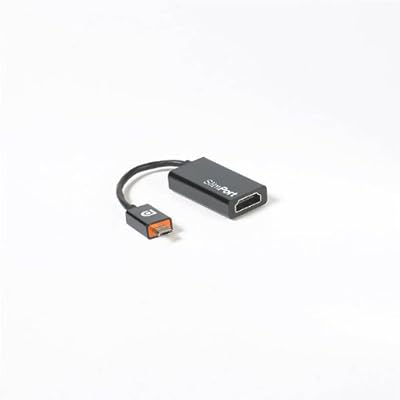
Nexus 4 USB OTG feature seems disabled by firmware (I think kernel modules), but its SlimPort HDMI works so far using this small adapter found on Amazon.

More on USB OTG is detailed on this issue report on Google Android project page. Google decided to change manual pages, changing the keyboard and mouse USB OTG support to Bluetooth ones. This wasn't the case few weeks ago (here it is the screenshot). Cause has been spotted on Gerrit code review (Mako cannot supply 5V). No confirmation by Google on this almost 600-stars issue.


Android 4.2 sets and locks the UI in landscape mode (exactly like Nexus 7).
No audio transport so far - at least with my monitor - an ASUS VH232H (has built-in speakers). Hope it will implemented in future Android updates.

Just for info, the main differences between MHL (seen on SGS SII, SIII, Note, Note II) are:
  • You don't have to plug the adapter into a charger. The option is there (if you want to charge the phone) but you can also use it without an adapter.
  • Slimport will have VGA, DVI, and DisplayPort adapters as well. Slimport to VGA will be useful for connecting to projectors.
  • Slimport supports higher resolutions, 60 fps, 3D, etc. Basically it's more future-proof.
  • Royalty-free. MHL still requires royalties to Silicon Image, like HDMI, while Slimport is DisplayPort, and royalty-free. The royalties are small, but they're there, and somebody has to pay for them!
More from Engadget.
Feel free to ask for screenshots, photos or informations.

Tuesday, 18 September 2012

Rikomagic MK802 II as Smart TV

Hardware


  • Rikomagic MK802 II ~75€
  • Microsoft VX 800 ~12€
  • USB Audio Adapter ~5€
  • USB Hub (Powered via power supply) ~7€
  • Wireless Keyboard (e.g. Logitech K400) ~25€

Software

Android settings

  • Animation 0.5x
  • Force GPU
  • Choose Null Keyboard as Input method
  • Change language to the preferred one
  • Set video to 720p@60Hz (1080p works, but it is too much for the hardware)

Todo

  • USB AUDIO Card Status
    • Works, I need to check if output device is set back to AUDIO_CODEC in Skype or Google Talk
  • Webcam Video Status
    • Video works on most apps
    • Device is properly detected by the kernel as UVC compliant camera
    • Skype/Google Hangout: it doesn't handle the output video stream correclty, so when video calling the receiver will have a greenish video
      • Can be related to sync frequency of webcam (50 or 60Hz), or endianess of library
  • Webcam Audio Status
    • CONNECT THE WEBCAM AFTER BOOTING UP
      • Developers hardcoded some changes in their messy way to handle audio: if you change the order/numbering of device some stuff will not work
    • Device is properly detected by the kernel as UVC compliant camera, exposing an additional audio card interface having a single capture endpoint
    • Seems MK802 II firmware is using alsa in the stack, but no asoundrc/alsa.conf file is used
    • [UPDATE] In 121020 firmware, 2 system properties appeared:
      • audio.input.active (AUDIO_CODEC, AUDIO_HDMI, AUDIO_SPDIF)
      • audio.output.active (AUDIO_CODEC, AUDIO_USB#)
    • [UPDATE] In 121020 firmware, the system setting audio_output_channel drives the output device
    • [UPDATE] In 121020 firmware, connecting an USB Audio card we obtain a pop up notifying the audio input and output can be changed
    • [UPDATE] In 121020 firmware, if an application needs audio recording capabilities (like Skype, Google Hangout, Google Talk in Voice chat), audio.output.active is set to AUDIO_CODEC (and no more AUDIO_HDMI)
      • Temporary workaround before automatizing it: go to Audio Settings and set output device back to AUDIO_HDMI
    • I wrote an app to show status of settings before and during a call (Skype or GoogleTalk)...
      • Unfortunately, they are not changing the setting, or at least, there is a setting key called audio_output_channel, which is always set to AUDIO_HDMI
  • Remount /system with RW capabilities
    • Already tried, unsuccessful: mount binary, busybox, adb over wifi, total commander - always "Fail: read only filesystem"
      • Seems some devices (like mine) have a corrupted /system partition, there are 2 solutions:
        • Fix the current image
          • Using a Lubuntu image we can manage to backup, recreate the partition and restore the data
          • Download the Lubuntu image
          • Write the image on the µSD (various methods and OSes here)
          • Once MK 802 II boots, you can use miniand as password
          • Backup the data in /system
          • Delete and re-create the partition (you can use GParted or fdisk)
          • Restore the data
        • Update the firmware or reinstall the existing one
  • How to Update to firmware 2012 10 20
  • Keyboard mapping
    • It is still in EN language, but it can be fixed with apps on Google Play, it is a minor issue

Notes

Trying to rebuild from scratch or using CM9 or CM10 repos is possible, but some features will surely break (video acceleration, wifi...). So the way we must follow should be trying to patch as little as possible to enable all the missing features.

Tuesday, 28 August 2012

Softmodem communication on Android

One of the projects I would like to proceed but I am a little stuck due to limited amount of time...
Being able to communicate between Arduino devices and Android via audio cable.
The idea is simple (and not mine): modulate a carrier wave using frequency changes in correspondence of binary data changes. It is called Frequency Shift Keying.
Obviously, transmission data rates are not suitable for media streaming, but enough for trasmitting small amount of information like commands, data from sensors connected to Arduino board, etc....


There is a similar project, called Androino. Another working example, this time on Apple hardware, is IR-Remote.
I think it was a university project but I think it has been abandoned. Source code is available but I wasn't able to make it work.

Hardware

On the hardware side, all I bought is:

Software

Talking about the software, the Arduino code is ready and available as serial interface. It has been developed by ARMS22 (authors of the board too). It is available on this website. They focused their attention on iPhone, but I want to make it work on Android.

An Android client existed too, but it has been removed from the website. For receiving data on Android, the main idea is to use the Audio API to record chunks of audio, perform a zero crossing algorithm on it to store the "distance" between crossings. Then perform an RLE to translate it into valid byte values.
This will be packed into a threaded library offering an input and an output queue as interface for reading incoming data.
For sending data, some code in Javascript is available and it should not be too difficult to implement it in Java.

The issue can be the battery consumption, since we are continuously recording&processing Audio, having no interrupt on Android side.
I am sure an ADK board is the best way to communicate with Android, but it wouldn't be cross-platform and cross-device.


ODROID-X ordered... New project!

ODROID-X is a development board based on Samsung Galaxy S III CPU (Exynos 4412) produced by Hardkernel.
It seems a perfect platform for Android Platform Development. Kernel sources for Android 4.0.4 are available and Linaro seems to support it too.
My first attempt will be to be aware of the potential of the board and on the stability/reliability of the system.
Then tackle down the missing features and/or bug fixes that would make it a perfect device for:

  • Mini PC (focusing on support for webcams, enabling video calls, chat apps)
  • Android Gaming Console (it seems to work properly)

Next steps...

ODROID-X is more or less ready for Android 4.0.4 (I'll confirm when I'll receive it). The missing features can be the support for webcams (at least the ones supported by Linux Kernel having UVC interface) and gamepads (USB HID or BT HID ones).
The webcam support has been studied and Aptina published a whitepaper providing an overview on Android ICS Camera HAL.

Game controllers seem to be already supported.
After the break, gaming capabilities of ODROID-X.

Sunday, 11 December 2011

Paypal, Facebook and SendMoney ...


I begin this post just quoting the rules for using Send Money.
If you send money within the US:
  • It's FREE if you pay using a bank account or your PayPal balance.
  • Credit or debit card fees are 2.9% plus 30 cents. We don’t offer the choice of receiver or sender paying the fee.
If you send US dollars outside the US:
  • 0.5-2% if you pay with a bank account or PayPal balance. The fee depends on where you send the money.
  • 3.4%-3.9% plus 30 cents if you pay with a credit card or debit card.
If you send money from another country, please refer to the Fee section of the local PayPal User Agreement accessible here.
Mashable and other websites followed this launch. As usual, italian media (the printed one) maybe misunderstood that the "social" side of this application is just the fact that it is linked to Facebook (and so supported by a huge number of potential users).
Paypal is not a really independent, it is a private company. Just to remember something about it, I'm quoting Wikipedia EN or PaypalIsEvil:

The current (2011/07/29) PayPal user agreement is a 26 page long pdf document.[73] If one buys an item from a PayPal merchant, one is agreeing to an additional layer of arbitration beyond the merchant himself. Thus even if the merchant has acted improperly, PayPal has not violated its own policy until the user has gone through an extra arbitration process with PayPal. According to their 34-page (single-spaced) user agreement, "If a sender of a payment files a Chargeback, the credit card issuer, not PayPal, will determine who wins the Chargeback," which confirms that a user can employ the normal (legally mandated) dispute resolution process with his credit card issuer, instead of following PayPal's procedures. A user who reads section 13.7 (on page 27) finds notice that the user may have chargeback rights independent of the dispute resolution procedure privileges granted by the PayPal UA. Section 14.1 is entitled "Contact PayPal First" indicates that in case of a dispute, the user must contact PayPal first.
In 2003, PayPal voluntarily stopped serving as an payment intermediary between gambling websites and their customers who engaged in online gambling. When they quit processing payments within online gambling community, they were the largest payment processor for online gambling transactions. In 2010, PayPal resumed accepting online gambling transactions but only in countries where online gambling is specifically legal and they only service those gambling sites who are properly licenced to operate legally in said jurisdictions. [74]
In September 2005, Richard Kyanka, owner of the website Something Awful, set up an account to collect donations for Hurricane Katrina to be given to the Red Cross. Owing to the high rate at which donations were made, the account was automatically frozen, and Kyanka criticized the time and difficulty involved in getting PayPal's customer service to unfreeze the account. In response to the concerns of Something Awful members over the charity used by PayPal, United Way, Kyanka finally opted to have the money refunded to the donors so that they could donate directly to their charities of choice, though PayPal did not refund exchange and handling fees for international donors.[75][76]
In March 2008, Australian current affairs show Today Tonight aired a segment criticising PayPal, with regard to safety, freezing accounts and customer service.[77]
Several PayPal gripe sites and blog posts[78] have been created complaining of problems such as the freezing of accounts of eCommerce stores if they experience rapid growth, preventing them from being able to pay suppliers and fulfill orders.[79] One such site, Paypalsucks.com,[80] ranked third on a Forbes Magazine listing of "Top Corporate Hate Web Sites" in 2005 based on "hostility" and "entertainment value" of web forum postings and other criteria.[81]
In June 2008, the Australian Competition and Consumer Commission found that, "The evidence available does not support the view that PayPal is the most secure method of payment, or offers the best service for all transactions."[82]
In February 2010, PayPal stopped or reversed all "personal" transactions in or out of India without prior notice. Funds already transferred and transactions that had previously been "completed" were reversed leaving many vendor accounts over-drafted. Companies, contractors and service providers throughout India were left in debt to PayPal for services they had already provided when PayPal, without warning or consent, returned funds vendors had already received and withdrawn.[83]
In spite of its international reach, PayPal has limited functionalites for multi-country users, most notably the impossibility to have bank accounts in several countries, or to have a shipping address in a different country than one's bank account / credit card.
In March 2010, PayPal froze donations to Cryptome, seizing over $5300 of in-transit donations.[84] PayPal refused to inform Cryptome of the reason for this action, claiming that to disclose why the donations had been confiscated would violate Cryptome's own privacy.[85] A week later, PayPal offered an apology, which was rejected by Cryptome founder John Young as "insulting and unacceptable".[86]
In September 2010, PayPal froze the account of Markus Persson, developer of independent video game Minecraft. His account contained around €600,000.[87][88]
In December 2010, PayPal permanently restricted an account used to raise funds for WikiLeaks citing it was in violation of the PayPal Acceptable Use Policy. At a conference in Paris, a PayPal VP, in response to an attendee's question, stated the account was restricted after PayPal was allegedly pressured by the U.S. State Department.[89] Afterwards, PayPal reiterated the decision was based on violation of PayPal's Acceptable Use Policy. This was followed by cyber attack on the paypal.com website and a boycott of PayPal, in which some users closed their PayPal account in protest.
In November 2011, PayPal moved all shipping to eBay. This move also forced businesses with multiple users to use only their administrative passwords for all employees, which opens the door to potential account fraud by merchant employees. As a results of this shipping change, many PayPal merchants already frustrated with PayPal fraud protection moved their shipping from PayPal/eBay to other online shippers such as Stamps.com[90]
In December 2011, PayPal froze funds in an account held by April Winchell, the owner of Regretsy, used for charitable giving, requiring the account holder to refund the donations collected but keeping the fees charged. [91][92]
Please, provide right information when publishing something.

Tuesday, 15 November 2011

Music takes a trip on Social Networks

This night, Facebook added to its interface a new Application entry, labeled "Music".
If you're logged in, you can reach the page using this link.
This move from Facebook Hq seems to be related to Google Music release, expected for tomorrow.
Google Music will be presented in Los Angeles during a special event, called These go to eleven. The event seems related/sponsored by T-Mobile, as Engadget told us few days ago.
The deal with T-Mobile consists on the possibility to directly bill purchased tracks. Exclusive content will also be available for T-Mobile customers for free.


A Cold War, which will put the spotlight on the "music" capabilities of social networks, (aka Google+ and Facebook).

Facebook role on Music Provider is to act as broker of music streaming services. At the moment, on the country I live now (France), we have:
I expect, on next weeks/months, to see:
  • Last.fm (job opportunities on the website can be an hint for upcoming "fully featured" service)
  • Pandora
  • Deezer
  • iTunes? (less likely)
Google role seems to be a little different: it will provide directly the music, signing agreements with music producers/distributors.
Google Music is avaliable as closed beta, accessible via invites. The number of available songs is still limited. Google partners with Universal, EMI, Sony Music, 23 independent labels on Google Music, scores exclusive content


Universal closed the Google Music deal just before tomorrow's event.

Google Music has been presented and delivered to all US users.
It is also possible to gain access from everywhere using proxies or using Tor technology.

A small detail... I had Google Music invites an I joined and I had no problems accessing to web interface. Maybe the choice of english language for the UI enabled someway the access for non US users.
I am not able to access Android Market, so I have no direct experience of it.

Stay tuned!

Tuesday, 1 November 2011

Kinect as Webcam on your PC [SOLVED]

So you want to use your Kinect as a webcam, uh?
Yes, it is possible to do that... And it is quite straightforward.

Follow those steps:

  • Download and install latest Kinect for Windows SDK beta
  • Download and install latest MS Visual Studio 2010 Runtimes (you can choose x86 or x64)
    • [Update] It is working with latest Beta 2 release, updated link below
  • Reboot your PC
  • Download KinectCam.ax file and store it in a path you're not going to touch anything for next 10 years (e.g. %WINDIR%)
  • Execute command line as Administrator (Right click on Cmd.exe and Run as administrator)
  • Enter the following command: regsvr32.exe "path of KinectCam.ax file"
  • Feel free to use your expensive webcam on Skype, Google Talk or whatever you want
For some troubleshooting or use openKinect package instead of official Kinect SDK, feel free to follow this link. More info about the creator of the DirectX VideoCapture Filter are there.

Obviously, on Linux, it is supported out of the box thanks to Linux Kernel.